Sunday, January 27, 2019

Non-Traditional Music and DAWs


This week I learned a lot about the mechanics of sound, and we used a program that captured that sound. Starting with the acoustic domain, moving into the analog domain. and then moving into the digital domain there are many steps that you we don't even think of because it happens so seamlessly. But understanding the steps can help us understand them processes of creating newer and better sounds. Last week we discussed how students need to have the opportunity to create and to improvise. We also discussed how technology can help students get to creating quicker. This week we continue that idea, but with the “other 80%” in mind. These students who are interested in music and want to be musical but are not in our traditional music classes and ensembles.

This week we used a program called Soundtrap. A digital audio workstations (DAW) that is cloud based. Like other DAWs, it has many options for music inputs, such as MIDI input, audio recording, and premade loops. The difference with this application and others is because it is located on the internet (cloud) students can create music anywhere and on any device. That provides a great opportunity for us as educators to scaffold music thinking with this program and other internet-based music programs. Learning and music development can occur beyond our classroom door. Students are excited to be creative and the more accessible we can make it for them, the greater the success we can have. By connecting the learning from the classroom to the home success can be increased.
In Music Learning Today, Bauer lays out seven guiding beliefs in reference to composition. Non-traditional music education follows these beliefs without the need for students to be in a school music group or follow traditional music learning/teaching methods. Programs like Soundtrap can provide opportunities for students to “reflect and critique frequently.” Also “Encourage revisions” by the students (Bauer 2014 p.60). Students will also be able to explore sounds and music without having to learn note names and instruments.

In a TED talk by Victor Wooten called Music as a Language (video below), he talks about how music teaching and learning music should be approached like language learning. Before you teach the notes names and concepts, music should be taught aurally. Not the rules of music, nor the skill of learning an instrument but learning and engaging with music freely. Bauer quotes Krats and his 7 levels of developing improvising abilities. Number one and two are exploration and process-oriented (Bauer 2014 p52) which would be the starting point for both traditional and non-traditional music learning, especially using programs such as Soundtrap can help in that development. The beginnings of audiation is in the exploration of sound.


Students who learn the traditional way can get to the point of audiation, or thinking in music, in time. Those who are part of the “other 80%” in the past, have been overlooked just because they are not in a music group. With technology we can provide a well-rounded education for all students.


UPDATE from first post: Incredible success with the first lesson utilizing Incredibox. I had students talking and responding to music using a premade Incredibox song. Many of them were excited and wanted to work on their own projects at home. Next lesson is a group composition.


Bauer WI. Music Learning Today: Digital Pedagogy for Creating, Performing, and Responding to Music. New York City: Oxford University Press; 2014.

Talks TED. YouTube. https://www.youtube.com/watch?v=2zvjW9arAZ0. Published May 29, 2013. Accessed January 27, 2019.

Thursday, January 17, 2019

Noteflight


A notation application that I had worked with this week is Noteflight. An example of this app is below. This is a web based app that can be worked on anywhere via computer, tablet, or smartphone,  as long as they have access to the internet. This app also provides opportunities to collaborate on the same project through the cloud. They can edit and listen to each other and participate together on different devices, in different locations. Group work and assignments, such as this, can provide students with support they need to allow development of creativity as long as the teacher has done his or her part in making the environment conducive to group learning.


Wednesday, January 16, 2019

Using Technology to Develop Creativity

There are many great students in music programs around the world. Developing musicians that participate in choir, band, orchestra, or other ensembles that are available at schools. These students will have an opportunity to develop a skill, appreciation, and love for music through these programs, but if we view these as the only musically inclined students we would be doing a disservice to what Williams noted as the "other 80%." (as cited in Bauer 2014 p.46). These "other" students are those who are musically inclined with a love for music and creative potential but are not in a school band, orchestra, or choir. By utilizing technology, music educators everywhere can help these students develop their musical skill, appreciation, and love of music just as those enrolled in a school music group.

Developing creative individuals is an amazing opportunity we have as music educators. Music educators have already found their love, passion, artistic ability, and have had many opportunities to develop their creativity. We must strive to provide that to all the students we have the privilege of teaching. By using technology we are able to increase that sphere of influence beyond students in a traditional music class. According to Bloom's Taxonomy creating is the highest of the cognitive processes. For a student to create something original it is not just a simple wave of a magic wand. The process of creating is how skills and techniques are developed that will positively influence other facets of students lives. Music educators are here to assist in that development and teach students that process. 

There are many guides for creative thinking and developing that creative process. Musically there are things as simple as rhythm echos and loops to teach about rhythm and beat as a foundation for future music creation. Some things as difficult as improvisation and composing original ideas in traditional notation. Each end of the difficulty spectrum both have a process in learning those skills. With the support of technology we are able to use programs such as Musescore, GarageBand, and many others to students so they can write, create, and record their own music. Technology provides students with instant auditory responses, being able to hear a creation step by step. With music creating software students have the ability to create both single musical lines as well as multiple instrument pieces and hear how they sound. The technology examples below are taken from Musescore.


(Images taken from an assignment as examples from Musescore original composer George Hess)

There would be a lot of set up and scaffolding the teacher would have to do in order for the student to have the sufficient skills to tackle these types of projects. Below are screenshots from a simpler music creating program app called GarageBand.

(Source: https://www.apple.com/mac/garageband)
Music educators can use digital instruments for making the creative processes more accessible. These tools could be utilized also by music educators to create their own loops for accompaniment in teaching harmony and improvisation. A simple affordable tool that can have many uses both for teacher and student. Both uses of this application would contribute to the development of the students creativity and the process that accompanies that creative product. This type of application reminds me of all the current top artists in the Pop music world. Many of them are musicians who are able to apply this type of synthesized instrument technology alongside traditional instruments to make some great songs. Some examples I can think of are the Chainsmokers, Coldplay, Imagine Dragons, Zedd, and many more.

There are many things to consider and remember while helping students learn this process no matter what the support tool is. First is to provide students opportunities to be creative. Next be sure to have or find the best resources available, utilizing technology when available. Remember to also have appropriate stimulation. Keeping in mind proper pedagogy and educational factors such as Vygotsky's Zone of Proximal Development as we think of the stimulation for creativity. For example correct and clear prompts, activities and expectations, and other best practices as we help students become better creators both in product and process. Finally, and what may be one of the greatest challenges, provide sufficient time. That would depend on each individual student, differentiation is key.
(Information derived from Bauer 2014 p.50.)


Monday, January 7, 2019

Let's talk about TPACK

Being a geek and lover of technology, I always wanted to use technology to enhance my students learning of music. The tools out in the world are amazing and can provide easier access to music creation, performance, and connection or the "content" of music education as mentioned in a class video. One of the issues that is presented in the class videos is with all the approaches to technology in the class each are technocentric* or tool based. Understanding the technology is important but when you focus on the tech rather than the content and pedagogy, it loses out on making a greater impact. (source of thoughts are here: VIDEO *5:20)

The ability for students to express themselves musically without the need of spending hours upon hours in a classroom or private lesson setting is a great opportunity for the students, especially those who do not have easy access to lessons or . Through technology we, as educators, have the opportunity to develop self driven music learners and artist. It is then becomes the responsibility music educators of the world to make use of that technology to support the students. Alongside our knowledge of music content and the pedagogy we can utilize technology to bring music experiences to our students to deepen their music ability and understanding. The new term that encompases these ideas is TPACK. Technological Pedagogical Content Knowledge.

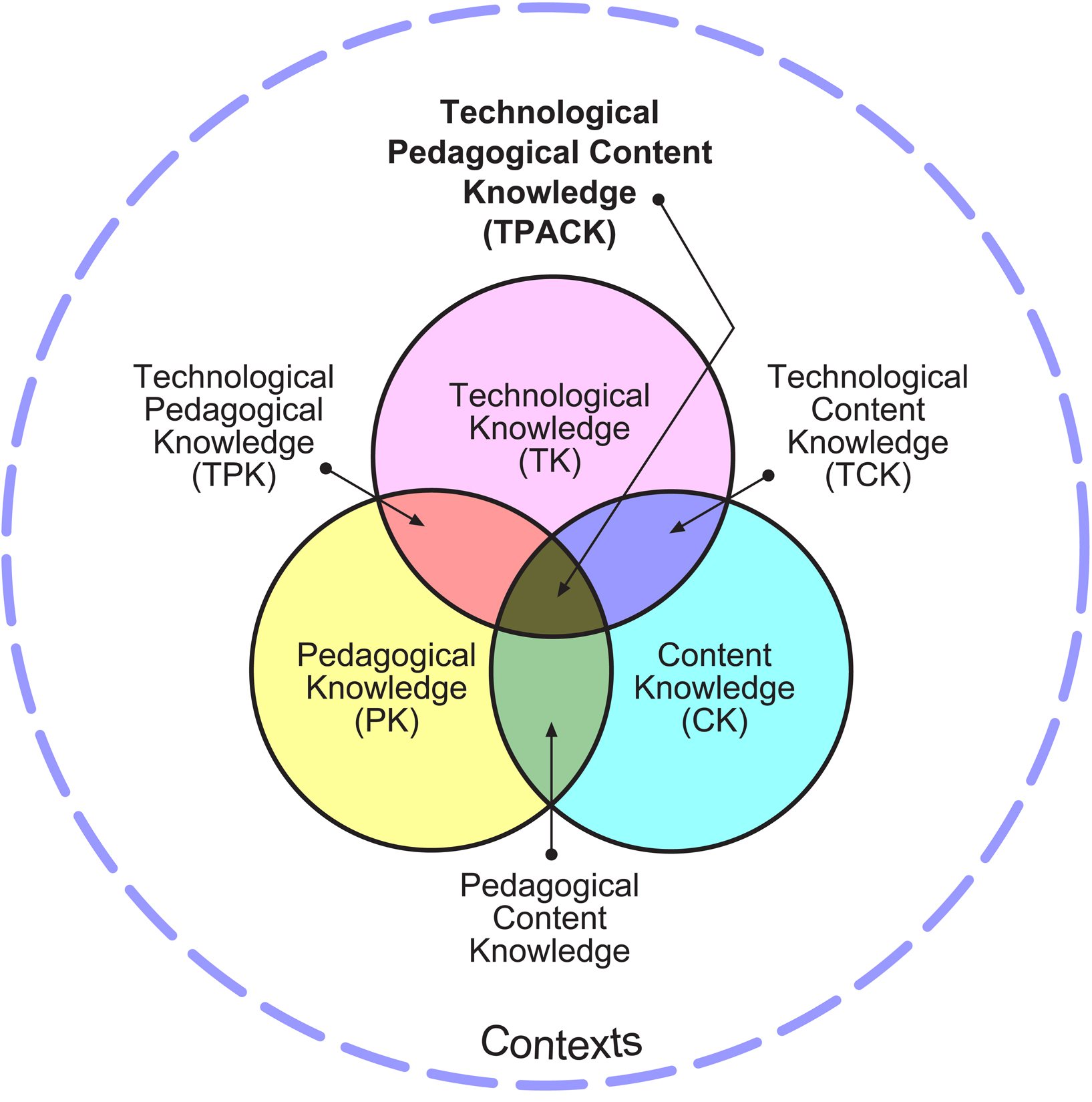
The model:
Image source: https://educationaltechnology.net/technological-pedagogical-content-knowledge-tpack-framework/

This model shows the three major parts of what a successful teacher considers in each and every lesson. Each individual circle and overlap are important ideas to remember during planning, execution, and evaluation of lessons. The what (content) and how (pedagogical knowledge) should be supported by the technology. In Music Learning Today, Digital Pedagogy for Creating, Performing, and Responding to Music (Bauer p.12-18) these ideas are explored in greater detail. It breaks down each section and intersection and provides the connections and definition for each. 

An in class experiment I will performing will be using a application I learned about in my technology assisted music learning class called Incredibox, I will develop a composition lesson or unit. My planning stages will use lesson plans/unit plans as normal with objectives based on the music standards with a new twist. I will be using Incredibox to not only present composition to the students but with support of the app I will be able to cover more music concepts such as responding to music and the parts such as meter, tempo, and parts. The app will also allow students to perform their compositions. They will then be able respond and critique their composition their own music. I would then also help them understand parts in music. I will be sure to follow up in a future blog post how successful it was. I am excited to begin my TPACK planning for my future lessons.

Here is my track I made from Incredibox as I toyed around with the app.
https://www.incredibox.com/mix/5C369DC49553E-V2