Saturday, February 23, 2019

Technology in Assessments and Development

As we approach the final section of our exploration of technology in music education, we now turn our attention to assessment, and professional development and organization. As we consider the methods of assessment using technology, we must always remember our TPACK, which involves our pedagogy and content being supported by technology. We must always remember assessment methods, principles, and reasons for our assessments. Assessments are there not to just run some numbers on a screen or on paper, but to gauge students’ level of understanding and provide feedback with opportunities for being better.

In our text, Bauer (2014 p.132) describes four purposes of classroom assessments. Number one, give students a clear picture of their progress and how they can improve. Two, encourage students to improve. Three, classroom assessments are formative in nature and four, formative assessments should be frequent. The first two of these purposes focus on the validity of the assessment to make sure that it aligned with learning outcomes, provides an indication of achievement, helps improve learning, and is reliable. The second of these purposes is very important, especially in music skill development and assessment.

Because many music classrooms are based on the development of performance skills the assessments that we use must provide the feedback that fits the correct pedagogy which we are using to teach these skills. As an example, if you give only a number score for a playing test it would provide only the students current situation, that would not facilitate the best method for development of skill. We could still use numbers to quantify the student result, but those numbers need to be alongside some specific feedback to help the student know what the next step would be. A technology tool we can use to provide both is Smartmusic.

We have discussed Smartmusic in a previous blog post. Smartmusic used as an assessment tool is fantastic. Teachers can both hear the students practice as well as provide that feedback right away. Something I learned from another music educator who was utilizing Smartmusic was one of the benefits of Smartmusic is you get to hear the students perform their best take, not just a one-time shot or snapshot of what could possibly be a bad day. Students can attempt and reattempt each assessment provided through Smartmusic. They practice and then perform the song. When they record themselves, they can make their evaluation and assess their own sound and they can try again if they think they can do better. This type of assessment, whether you use Smartmusic or a different recording assessment method, provides opportunities for the students not only to give you a snapshot of their current skill level but it also provides opportunities for the students to practice, assess themselves, and them see their progress. The program can give them a very clear picture of how to improve and paired with teacher feedback can become a powerful tool to make music assessment more meaningful.

Part of the feedback process is to make sure that that feedback is regular in terms of timely feedback specific to criteria and provide students opportunities to give their own feedback. Aside from these recording assessments and developing skills, there are other assessment methods and tools to help us as educators understand how the students are understanding the musical material. There are very simple paper and pencil assessments that can assess musical knowledge and technology can keep us organized. Using a Google form, for example, can be an easy way to organize and get those snapshot formative assessments on a regular basis so that we can adapt our teaching to help the learner obtain that information and align with learning outcomes.

Using technology to organize ourselves in the classroom as well as our professional lives are key to helping us become more successful teachers. One of the greatest free tools available is Google suites. Using the calendar, the drive, Google Docs, and all the other tools, utilizing these can help us as educators both provide learning opportunities that are easily accessible in the class or at home and provide opportunities for us as educators to be more focused and organized. another one of the other tools that I like to use personally is OneNote from Microsoft. I'm able to keep notes and access it from multiple locations and devices as well as keep my professional notes from conferences, take pictures and put it in the same document, add handouts and links for resources in my notes. Keeping things in one easily accessible location helps me be more productive.


With both our professional lives and classrooms being organized, we will provide greater opportunities for our students to learn. The impact of a balanced education that includes music education is great, music can help us become better people with more fulfilling lives. So, it is vital that we can organize ourselves in such a way so we can help our students learn and not worry so much about the vital small little details, details which allow our music program successful. Using technology to streamline those small details will help us in our classrooms to a much greater degree so we are able to be the facilitators of students musical development. 

Sunday, February 17, 2019

Technology and Instruction

With all the fun technology, resources, and new TPACK concepts we now will tie it all into our instruction and instructional design. With the many different types of students, we will have the opportunity to teach, we must remember with our instruction that we are there to facilitate the learning experience. In our text, Bauer mentions this and says "...when developing learning experiences utilizing technology, teachers need to contemplate how the technology may best be used to facilitate the learning experience." (Bauer 2014 p.147). This is a reminder to have us always consider what our TPACK approach is for all our instruction. 

As we build our instruction with these things in mind, we also need to consider how our technology can assist in helping students learn in context, learn actively, build social learning experiences, and allow students to reflect on their learning (Driscoll, as mentioned by Bauer 2014 p.147). These ideas are major factors in helping students learn. 

The first these ideas from Driscoll is students learn within the context of what they already know or through the lens of their prior knowledge. Technology can be used to help build or develop that knowledge. In an ensemble, you can play a song or video in a style before your students play a piece that is in a similar style. Bauer mentions a similar example but with learning an instrument style. One of my favorite lessons that I use technology in class is when I do taiko drums (buckets) with my class and before we begin drumming, I play this video to provide as an example of the sound and style. 


The second of these ideas or learning is active learning. While thinking of these ideas and concepts, teachers play the role of facilitators rather than instructors. Learning becomes less textbook and more experiential. Teachers are to help provide opportunities to experience the content. One example we discussed in our text is a WebQuest.

As a brief explanation, a WebQuest activity is a learning experience that utilizes internet resources to develop a finial project. The teacher creates a role for the student, such as a reporter, investigator, etc. The sources, expectations, and are all provided by the teacher to provide a structured learning experience. Students will then create their own learning experience through this technology integrated lesson model.

The third idea is social learning.  Bauer mentions in the text "Learning doesn't usually happen in isolation." and he continues saying social learning "...emphasize that observation, imitation, and modeling are important models of learning."(2014 p.148). It is here that technology can help with students learning through cloud-based programs such as Noteflight and Soundtrap. The music classroom provides greater opportunities for collaborative learning. Students will be able to compose, perform, and record music while working in different locations. 

The final idea from Driscoll's framework for learning is reflection. Bauer says "It requires students to be metacognitive" they must think about their thinking. Students need to consider "what they learned and what they still need to learn." (2014 p. 149). Technology can be a tool for students to listen to their own performance or composition. 

I am currently in a unit of composition with my students. We have learned the technology, developed some ideas, and now are at the stage of critiquing their compositions and making it better. Through technology, the class is able to both develop musical ideas and respond in a very short period of time. The focus on that reflective process and thinking about why they made the decisions they did and how they can make it better has been greatly enhanced with the use of technology.

The unit is designed to touch on all four of Driscoll's learning ideas. It also is developed with differentiation in mind, it provides many pathways to the same goal. To do that we as educators need to remember the three principles of meeting the needs of all students as Bauer mentions in our text.
1) Flexible methods of representation.
2) Flexible methods of expression and apprenticeship.
3) Multiple and flexible options for engagement.
 (2014 p.159)

  
As we teach our content and bring music into the lives of all our students, we can use technology to enhance the learning experience. Remembering all the pedagogical content such as those discussed in this blog, we not only become greater educators, but our students will become greater learners and in turn, musical individuals, enhancing their lives and those around them.


Bauer, William I. (2014), Music Learning Today, Digital Pedagogy for Creating, Performing, and Responding to Music: New York NY, Oxford University Press

Sunday, February 10, 2019

Listening and Responding to Music


Composition and creation is key to a good music education. Throughout our lives we are not always creating. Music listening and responding should be developed just as much music creation. We should develop these skills not just for fun, but it can provide a greater fulfillment in our musical development. We can learn from recordings and performances and help our skills musically. One tool we experimented with this week was Spotify. 

I mentioned this website last week in the blog. We were able to develop a playlist for our use in the classroom. I personally use Google Play Music and have created many playlists for my classroom use. This exercise was a great collaboration experience. I was able to find more music I would share with my students by looking at all the different types of playlists that others in my class created. The ease of access and incredible library that Spotify has is such an amazing resource. 

Bauer quotes Christopher Small and the word he coined, "Musicking", which Small says it is "to music. He further elaborates and says "To music is to take part, in any capacity, in a musical performance, whether by performing, by listening, by rehearsing or practicing, by providing material for performance (what is called composition) , or by dancing."(Small, quoted by Bauer 2014 p. 106) These things are all important in the musical development of any student. Using the available technology we can expand the library of available music for listening and responding. 

We are able to take a technology that is so often overlooked as anything except as a little fun, passive activity and turn it into a Musicking experience. We can help students move away from just hearing but into a listening mindset. We then can use technology as a tool to help develop critical thinking and active listening skills. As an educator we must help students really listen. We also need to keep in mind that students will not have a developed musical pallet and we need to help them expand their music taste. 

With our thoughts on the "other 80%" and even more who will not continue their music learning, we can help all students develop a greater method of listening for the rest of their lives. Bauer gives us some great approaches to music listening. Balance, variety, choice, repeated listening, scaffolding, developing a musical vocabulary, visual chart/map of music, movement, and sharing with discussing are the basic ideas from Bauer's approaches (Bauer 2014 p.110). These ideas can provide us as music teachers a direction for teaching students to listen rather than hear.

The next consideration of helping students listen is the perspective of listening we will use and how the technology can support those goals. Theory or aural skills, history and culture, world music, and interdisciplinary understanding are the major perspectives Bauer mentions (Bauer 2014 p. 114). There are many options to pick from for each one, and we should align it with our students needs and help them develop musical listening skills. Below are two resources to use when making some of these considerations.


Bauer, William I. (2014), Music Learning Today, Digital Pedagogy for Creating, Performing, and Responding to Music: New York NY, Oxford University Press

Friday, February 1, 2019

Performance Skill Development With Technology and DAW 2.0


This week we will dive into performance skill development and the technology can be implemented. The first strategy we can implement technology with is modeling, which is something I do not do enough of in my own class. In his book, Bauer (2014) says “motor learning still takes place when people watch and listen without actually engaging in the motor movement skill. While the learning gains will not be as large as with physical practice, a definite improvement can occur.”  (p.85). There is a technology we take for granted in our everyday life and as educators can be utilized more often for models of skill development and music engagement outside of our classroom. Musical recordings. We can use recordings of professionals and others who are skilled at an instrument or quality singers to help them hear the correct tone, technique, and high-quality sounds. I have created a playlist of Youtube videos as an example. Playlist Pro Players.

The available resources are incredible. Starting with one of the many music websites, Spotify. Students may not know where to look for proficient players/sounds and as educators, we know what to listen for, we can be their guides. Compiling song lists or artist list on Spotify we can provide a good listening list for developing musicians. Youtube would be the next site we can direct students to. Creating a playlist of videos for students to watch professional groups and musicians. We can begin using technology to support the development of their psychomotor skills and show them good models for them to improve their sound would be the goal with listening.

As students work toward developing performance skills, a key part of that is practice. A great piece of technology to assist with practice is Smartmusic. Teachers can organize the specific pieces of music for students to practice, send it to them electronically and hear recordings of the student's practice. As students are practicing, they can receive immediate feedback as they play. Another great thing about Smartmusic is the many accompaniments that are available for many selections in Smartmusic including method book exercises. Students can develop a sense of the harmonic context of what they are playing and rather than playing by themselves. Students become more engaged as when they are playing with a group. 

I recently began using Smartmusic and I have seen the excitement when we use it in class to play along with the accompaniment provided by Smartmusic making them focused a little more. They can then see the progress they make. Hearing their own recording helps them recognize their progress in performing with the feedback we can provide quickly in the program.

There are two important factors of great practice habits mentioned in the text, "quantity, and quality" (Bauer 2014 p.81). Doing several sessions over the week is more impactful than one long practice session in a week. Quality can be questioned at times but to help the students strive for better quality, outside of using technology, will depend on teaching and modeling best practice habits. If we set the student up for success and help them see it and increase their self-efficacy, their intrinsic motivation increases along with it. Self-efficacy and its relationship with intrinsic motivation can be a great tool to further develop their skills. 

There are many more uses of technology we should remember in our everyday classes, such as metronomes, tuners, and audio recording devices. With TonalEnergy Tuner, for example, students will be able to hear the note as well as have a visual for the specific note they are playing. combining the visual of a tuner in front of them they can develop the skill of adjusting as they play. The visual giving them a grasp of their location on the note (too high or low). It can be used to guide them alongside recordings of proficient players students to hear what good playing sounds like and discuss the sound and practice skills to get that sound or note in tune. 

Bauer, William I. (2014), Music Learning Today, Digital Pedagogy for Creating, Performing, and Responding to Music: New York NY, Oxford University Press

Websites mentioned:
www.Smartmusic.com (Paid membership required for many features)


Sunday, January 27, 2019

Non-Traditional Music and DAWs


This week I learned a lot about the mechanics of sound, and we used a program that captured that sound. Starting with the acoustic domain, moving into the analog domain. and then moving into the digital domain there are many steps that you we don't even think of because it happens so seamlessly. But understanding the steps can help us understand them processes of creating newer and better sounds. Last week we discussed how students need to have the opportunity to create and to improvise. We also discussed how technology can help students get to creating quicker. This week we continue that idea, but with the “other 80%” in mind. These students who are interested in music and want to be musical but are not in our traditional music classes and ensembles.

This week we used a program called Soundtrap. A digital audio workstations (DAW) that is cloud based. Like other DAWs, it has many options for music inputs, such as MIDI input, audio recording, and premade loops. The difference with this application and others is because it is located on the internet (cloud) students can create music anywhere and on any device. That provides a great opportunity for us as educators to scaffold music thinking with this program and other internet-based music programs. Learning and music development can occur beyond our classroom door. Students are excited to be creative and the more accessible we can make it for them, the greater the success we can have. By connecting the learning from the classroom to the home success can be increased.
In Music Learning Today, Bauer lays out seven guiding beliefs in reference to composition. Non-traditional music education follows these beliefs without the need for students to be in a school music group or follow traditional music learning/teaching methods. Programs like Soundtrap can provide opportunities for students to “reflect and critique frequently.” Also “Encourage revisions” by the students (Bauer 2014 p.60). Students will also be able to explore sounds and music without having to learn note names and instruments.

In a TED talk by Victor Wooten called Music as a Language (video below), he talks about how music teaching and learning music should be approached like language learning. Before you teach the notes names and concepts, music should be taught aurally. Not the rules of music, nor the skill of learning an instrument but learning and engaging with music freely. Bauer quotes Krats and his 7 levels of developing improvising abilities. Number one and two are exploration and process-oriented (Bauer 2014 p52) which would be the starting point for both traditional and non-traditional music learning, especially using programs such as Soundtrap can help in that development. The beginnings of audiation is in the exploration of sound.


Students who learn the traditional way can get to the point of audiation, or thinking in music, in time. Those who are part of the “other 80%” in the past, have been overlooked just because they are not in a music group. With technology we can provide a well-rounded education for all students.


UPDATE from first post: Incredible success with the first lesson utilizing Incredibox. I had students talking and responding to music using a premade Incredibox song. Many of them were excited and wanted to work on their own projects at home. Next lesson is a group composition.


Bauer WI. Music Learning Today: Digital Pedagogy for Creating, Performing, and Responding to Music. New York City: Oxford University Press; 2014.

Talks TED. YouTube. https://www.youtube.com/watch?v=2zvjW9arAZ0. Published May 29, 2013. Accessed January 27, 2019.

Thursday, January 17, 2019

Noteflight


A notation application that I had worked with this week is Noteflight. An example of this app is below. This is a web based app that can be worked on anywhere via computer, tablet, or smartphone,  as long as they have access to the internet. This app also provides opportunities to collaborate on the same project through the cloud. They can edit and listen to each other and participate together on different devices, in different locations. Group work and assignments, such as this, can provide students with support they need to allow development of creativity as long as the teacher has done his or her part in making the environment conducive to group learning.


Wednesday, January 16, 2019

Using Technology to Develop Creativity

There are many great students in music programs around the world. Developing musicians that participate in choir, band, orchestra, or other ensembles that are available at schools. These students will have an opportunity to develop a skill, appreciation, and love for music through these programs, but if we view these as the only musically inclined students we would be doing a disservice to what Williams noted as the "other 80%." (as cited in Bauer 2014 p.46). These "other" students are those who are musically inclined with a love for music and creative potential but are not in a school band, orchestra, or choir. By utilizing technology, music educators everywhere can help these students develop their musical skill, appreciation, and love of music just as those enrolled in a school music group.

Developing creative individuals is an amazing opportunity we have as music educators. Music educators have already found their love, passion, artistic ability, and have had many opportunities to develop their creativity. We must strive to provide that to all the students we have the privilege of teaching. By using technology we are able to increase that sphere of influence beyond students in a traditional music class. According to Bloom's Taxonomy creating is the highest of the cognitive processes. For a student to create something original it is not just a simple wave of a magic wand. The process of creating is how skills and techniques are developed that will positively influence other facets of students lives. Music educators are here to assist in that development and teach students that process. 

There are many guides for creative thinking and developing that creative process. Musically there are things as simple as rhythm echos and loops to teach about rhythm and beat as a foundation for future music creation. Some things as difficult as improvisation and composing original ideas in traditional notation. Each end of the difficulty spectrum both have a process in learning those skills. With the support of technology we are able to use programs such as Musescore, GarageBand, and many others to students so they can write, create, and record their own music. Technology provides students with instant auditory responses, being able to hear a creation step by step. With music creating software students have the ability to create both single musical lines as well as multiple instrument pieces and hear how they sound. The technology examples below are taken from Musescore.


(Images taken from an assignment as examples from Musescore original composer George Hess)

There would be a lot of set up and scaffolding the teacher would have to do in order for the student to have the sufficient skills to tackle these types of projects. Below are screenshots from a simpler music creating program app called GarageBand.

(Source: https://www.apple.com/mac/garageband)
Music educators can use digital instruments for making the creative processes more accessible. These tools could be utilized also by music educators to create their own loops for accompaniment in teaching harmony and improvisation. A simple affordable tool that can have many uses both for teacher and student. Both uses of this application would contribute to the development of the students creativity and the process that accompanies that creative product. This type of application reminds me of all the current top artists in the Pop music world. Many of them are musicians who are able to apply this type of synthesized instrument technology alongside traditional instruments to make some great songs. Some examples I can think of are the Chainsmokers, Coldplay, Imagine Dragons, Zedd, and many more.

There are many things to consider and remember while helping students learn this process no matter what the support tool is. First is to provide students opportunities to be creative. Next be sure to have or find the best resources available, utilizing technology when available. Remember to also have appropriate stimulation. Keeping in mind proper pedagogy and educational factors such as Vygotsky's Zone of Proximal Development as we think of the stimulation for creativity. For example correct and clear prompts, activities and expectations, and other best practices as we help students become better creators both in product and process. Finally, and what may be one of the greatest challenges, provide sufficient time. That would depend on each individual student, differentiation is key.
(Information derived from Bauer 2014 p.50.)


Monday, January 7, 2019

Let's talk about TPACK

Being a geek and lover of technology, I always wanted to use technology to enhance my students learning of music. The tools out in the world are amazing and can provide easier access to music creation, performance, and connection or the "content" of music education as mentioned in a class video. One of the issues that is presented in the class videos is with all the approaches to technology in the class each are technocentric* or tool based. Understanding the technology is important but when you focus on the tech rather than the content and pedagogy, it loses out on making a greater impact. (source of thoughts are here: VIDEO *5:20)

The ability for students to express themselves musically without the need of spending hours upon hours in a classroom or private lesson setting is a great opportunity for the students, especially those who do not have easy access to lessons or . Through technology we, as educators, have the opportunity to develop self driven music learners and artist. It is then becomes the responsibility music educators of the world to make use of that technology to support the students. Alongside our knowledge of music content and the pedagogy we can utilize technology to bring music experiences to our students to deepen their music ability and understanding. The new term that encompases these ideas is TPACK. Technological Pedagogical Content Knowledge.

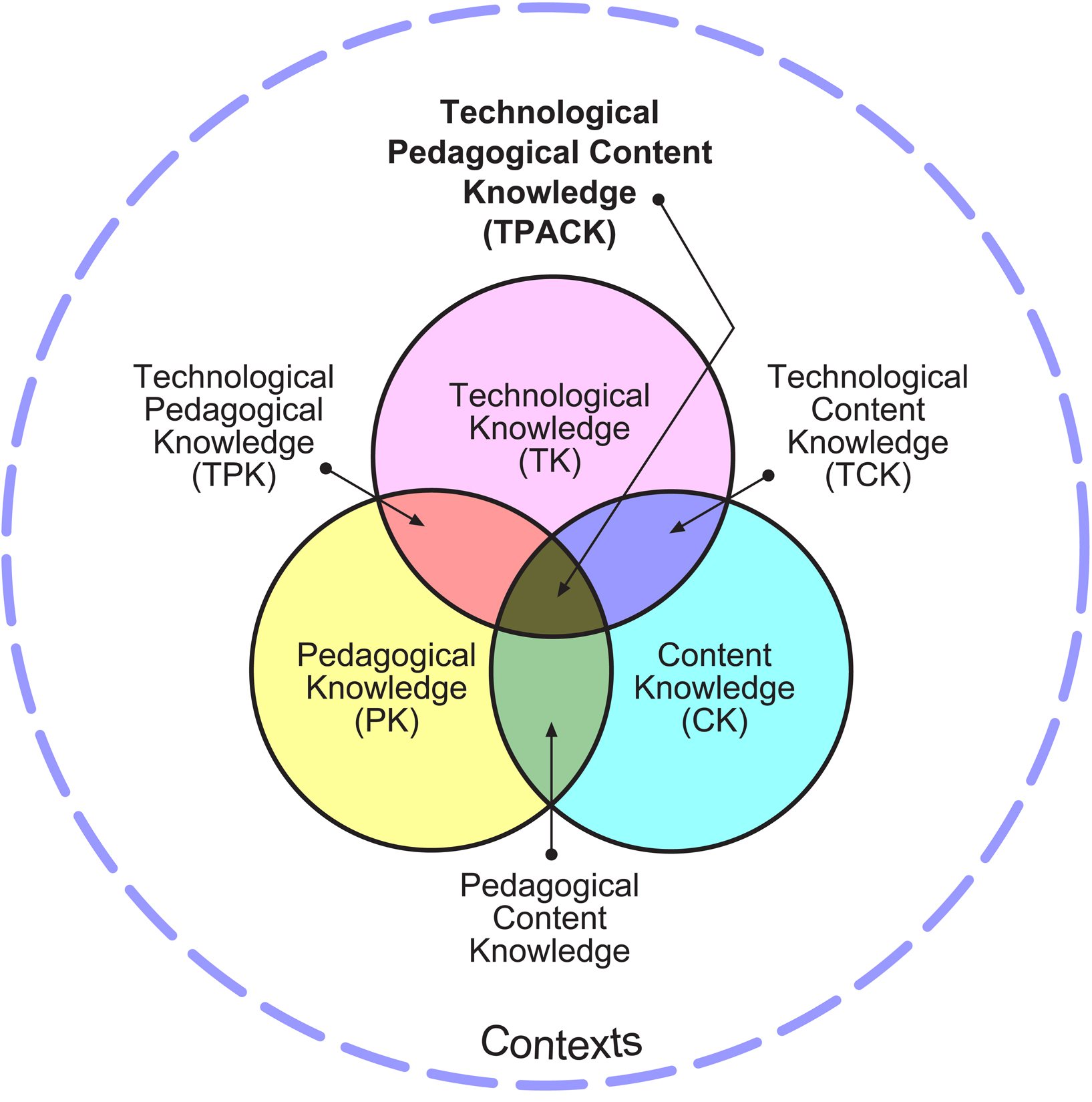
The model:
Image source: https://educationaltechnology.net/technological-pedagogical-content-knowledge-tpack-framework/

This model shows the three major parts of what a successful teacher considers in each and every lesson. Each individual circle and overlap are important ideas to remember during planning, execution, and evaluation of lessons. The what (content) and how (pedagogical knowledge) should be supported by the technology. In Music Learning Today, Digital Pedagogy for Creating, Performing, and Responding to Music (Bauer p.12-18) these ideas are explored in greater detail. It breaks down each section and intersection and provides the connections and definition for each. 

An in class experiment I will performing will be using a application I learned about in my technology assisted music learning class called Incredibox, I will develop a composition lesson or unit. My planning stages will use lesson plans/unit plans as normal with objectives based on the music standards with a new twist. I will be using Incredibox to not only present composition to the students but with support of the app I will be able to cover more music concepts such as responding to music and the parts such as meter, tempo, and parts. The app will also allow students to perform their compositions. They will then be able respond and critique their composition their own music. I would then also help them understand parts in music. I will be sure to follow up in a future blog post how successful it was. I am excited to begin my TPACK planning for my future lessons.

Here is my track I made from Incredibox as I toyed around with the app.
https://www.incredibox.com/mix/5C369DC49553E-V2